
Do you still remember the tedious process of uploading a document via email and sending it to a colleague in the next room? Only to then, after logging in, entering the address, and uploading, receive the message that the maximum file size is too large? Which then requires you to transfer the data to a USB stick and bring it to your colleague? Or even fax the file?
Fortunately, in the age of digitalization, we are spared many laborious workflows. Instead, today you can upload and share files within seconds. There are no maximum file size limits, broadband restrictions, or other annoyances.
On the contrary, files can now be shared conveniently, quickly, and securely by selection or drag-and-drop. This shortens workflows, makes processes more effective, and saves time.
In this article, you will learn exactly how sharing files online can work and what prerequisites are needed.
1. Sharing Files – Making Collaboration Fast, Effective, and Smooth
2. Uploading and Sharing Data – Not Just for Tech Enthusiasts
3. Uploading and Sharing Files – How It Works in a Few Steps and Clicks
4. Uploading and Sharing Files – Act Now and Take the Decisive Step
Sharing Files – Making Collaboration Fast, Effective, and Smooth
What was once a mystery, laborious, and a true horror for our parents is now done with a click of a mouse: sharing files. The process has never been so fast and effective.
Thanks to the increasing use of clouds, it is possible to share files online, collaborate on a document with internal users via Team Share or with guests via sharing, and track changes.
Whether you are in the same office, the same country, or on another part of the world: uploading and sharing files works across countries and borders, on every continent and in every time zone.
All you need to upload a file online is an internet-enabled device, a file, access to a cloud, and the internet. Whether in the office, home office, or during international assignments: uploading and sharing data is no longer a difficulty.
For example, the leitzcloud allows beginners and advanced users to upload files within seconds. There are no limits on file sizes or bandwidth restrictions.
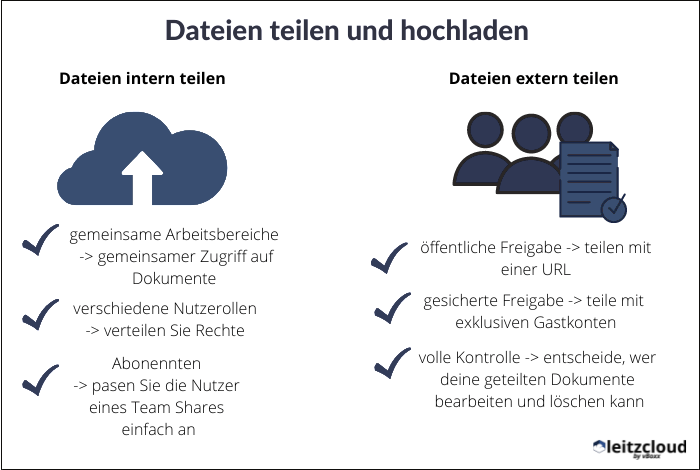
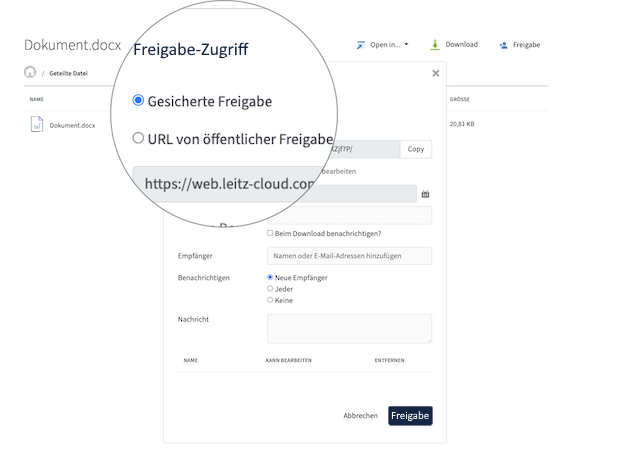
Furthermore, customers can choose between two options when uploading and sharing files with guests:
- Secure sharing with free guest user accounts
- Public sharing via URL
In addition, it is possible to create an unlimited number of guest accounts for collaboration with external partners or employees.
Uploading and Sharing Data – Not Just for Tech Enthusiasts
The leitzcloud solution is user-friendly and has a simple and clear structure for administrators and users. This way, anyone can successfully upload and share data.
Thanks to easy file access, your colleagues can access and, for example, edit documents from anywhere. This facilitates and accelerates collaboration.
If, for example, you enter a tunnel during a train journey and the internet connection breaks, you can still work on the document offline. All documents are automatically uploaded and synchronized via the sync tool when you are back online.
To combine old with new and not overwhelm newcomers, the use of Word, Excel, and presentations remains possible. Uploading and sharing files at the end of the process, for collaborative work or an interim meeting, is possible at any time.

It’s that simple
Sharing, uploading, and editing files is child’s play with leitzcloud.
Create a free trial account now and try it out for yourself!
For new customers, an online demonstration is offered to make the transition easy. This includes a demonstration of uploading and sharing files.
Specially developed video tutorials and instructions help with questions about uploading files online, as do online documentation and FAQs.
True to the motto: there are no silly questions, customer service is available to assist you with advice and support if problems arise when sharing files. Your problem will be addressed and quickly resolved via live chat, email, or phone.
Because cloud solutions are meant to provide solutions and quickly and securely support you with every problem: from uploading and sharing files, to questions regarding Team Share or Corporate Governance, online editing, 2-factor authentication, etc.
Beyond user-friendly and intuitive data uploading and sharing, leitzcloud offers a variety of functions, such as:
- Governance functions to maintain an overview
- Individual organization settings to your liking
- Share and collaboratively edit files online
- High GDPR-compliant security thanks to storage on German servers in TÜV-certified data centers
- Individual branding of your cloud including company logo, etc.
- Customer service for questions and feedback
- Remote deletion, activity log, real-time synchronization, Outlook integration, and much more.
Advantages of uploading and sharing files with leitzcloud
As mentioned earlier, uploading and sharing files was a laborious process for years: whether by email, link, USB stick, or fax, it always took several minutes to complete the process.
Documents were duplicated, supplemented, and one had to keep track and coordinate to avoid working on files simultaneously. Depending on the situation, the file was too large, the internet too slow, or the document was lost.
Thanks to a cloud, you are on the safe side today and in the future. Because uploading and sharing files is simple and user-friendly, done in seconds.
With cloud solutions, you can…
- Edit documents online and offline
- Work alone or in a team
- Collaborate with partners worldwide
- Trust in security through and with shares
- Utilize a wide range of functions
- Manage downloads
- And much more!
Thanks to the cloud, it is possible to work on documents together in real-time and track changes easily and precisely.
This is achievable thanks to interfaces with offline clients for Mac and Windows or via app for iOS, Android, or Windows Phone. Uploading and sharing files is possible on various devices such as computers, laptops, smartphones, tablets, etc., thanks to multi-platform compatibility.
leitzcloud can do a lot
leitzcloud is versatile and can significantly simplify your work.
Find out how you can use leitzcloud in your company.
Numerous extra functions simplify daily internal work, such as:
- File revisions, with which you can use older editing states and restore deleted items
- Document locking, which locks a currently edited project for others
- Corporate Governance, to keep track of all activities and see what is deleted, moved, or edited by which user
When collaborating with external partners, unlimited guest user accounts are possible. A secure share including a guest account is automatically created for the recipient when you share your documents.
Alternatively, public sharing via a link can be quickly implemented, allowing any owner to access selected folder contents.
Uploading and Sharing Files – How It Works in a Few Steps and Clicks
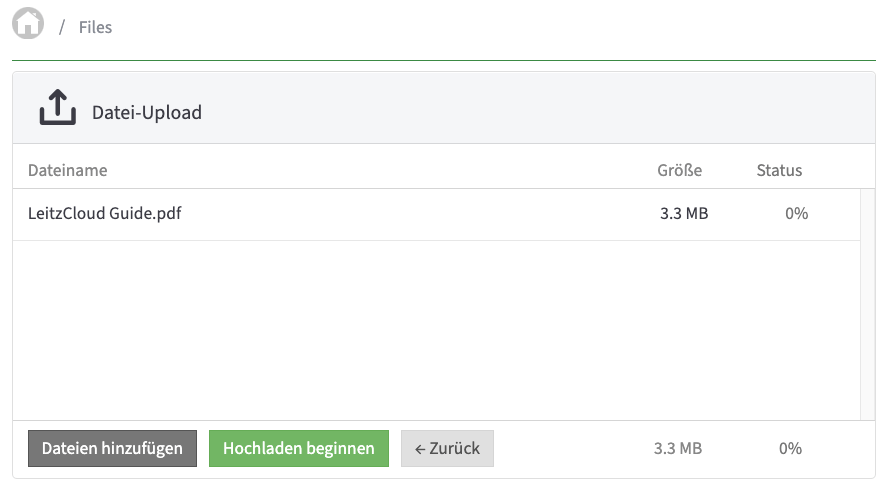
Upload file:
- Open leitzcloud.
- Go to “My Files”.
- Click “Upload files”.
- Click “Add files” and select the appropriate file.
- Or: Select file by drag and drop.
- Click the green button named “Start upload”.
- If the file was successfully uploaded, the feedback appears: “1/1 files uploaded”
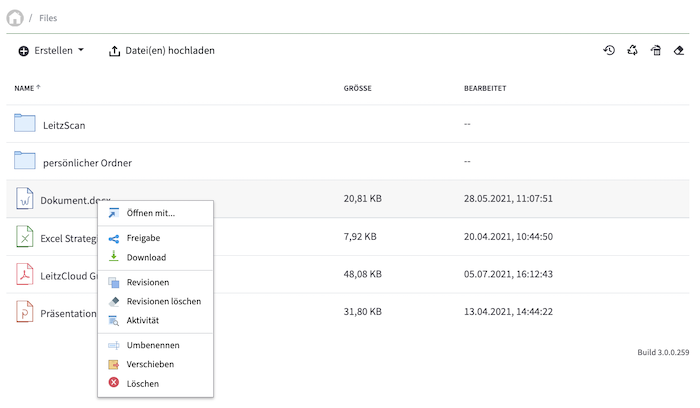
Share file:
- Go to “My Files”.
- Select the desired file. Right-click, “Share”.
- Select recipients and individual settings (e.g., “Notify on download”, Person XY “Can edit” or set an expiration date for the share)
- Click the green button named “Share”.
Uploading and Sharing Files – Act Now and Take the Decisive Step
Does your company have multiple locations, or do you frequently work with external partners or many employees? Then simplify these processes and workflows by using a cloud.
A 2016 study, conducted by the auditing firm KPMG and the research department of the digital association Bitkom Research, noted the following: 74 percent of surveyed companies in Germany confirmed an improvement in performance and IT efficiency due to cloud usage.
Not a single company reported any adverse effects. Nevertheless, cloud solutions were only used by about a quarter of businesses.
Falling behind instead of progressing? It’s just a small step, requires only a few clicks and a short familiarization period. To then benefit from numerous advantages.
We would be happy to discuss your individual wishes and ideas with you, starting from uploading and sharing files, to integrated branding and various governance functions.
leitzcloud was developed for businesses and offers an efficient solution for your operations.
Try out uploading and sharing files, as well as numerous setting options and extras. And convince yourself of our services and offers during the two-week free trial phase.
We are convinced that your company will benefit from a collaboration. Take a step into the future, utilize numerous offers that facilitate work within the team and with external partners.
And show your environment that you are using new structures to make work processes more effective, transparent, goal-oriented, faster, and simpler.
Try it now
Create a free account and work with the full functionality of leitzcloud!
No payment information required. Just a few clicks.